TeachBetter.ai Version 3.0: Introduces Powerful New Interactive and Multimedia Capabilities with one click presentations and 100+ simulations
Vipin Kumar
|
 24 November, 2025
Artificial intelligence is reshaping education. TeachBetter.ai continues to lead this transformation by building tools that help teachers teach better and students learn more deeply. Today, we are excited to introduce a powerful set of upgrades. These upgrades make the platform more interactive, more visual, and significantly more capable than ever before. These enhancements strengthen TeachBetter.ai’s position as one of the most comprehensive AI teaching assistants for K–10 education.
Over the past year, TeachBetter.ai has earned the trust of thousands of teachers, parents, and students across India. Educators have used the platform to create lesson plans, worksheets, question banks, stories, projects, activities, and concept explanations within minutes. Students rely on TeachBetter.ai to clarify doubts, study safely, and understand topics with greater confidence. With this new launch, the platform becomes more dynamic and more engaging—taking a major step toward truly interactive learning.
As the role of AI in education evolves, teachers need more than basic content-generation tools. They need solutions that explain visually, engage learners deeply, and connect concepts to real-world situations. TeachBetter.ai has always been built around this mission. The latest upgrade marks a significant leap toward a richer, multimedia-driven teaching experience.
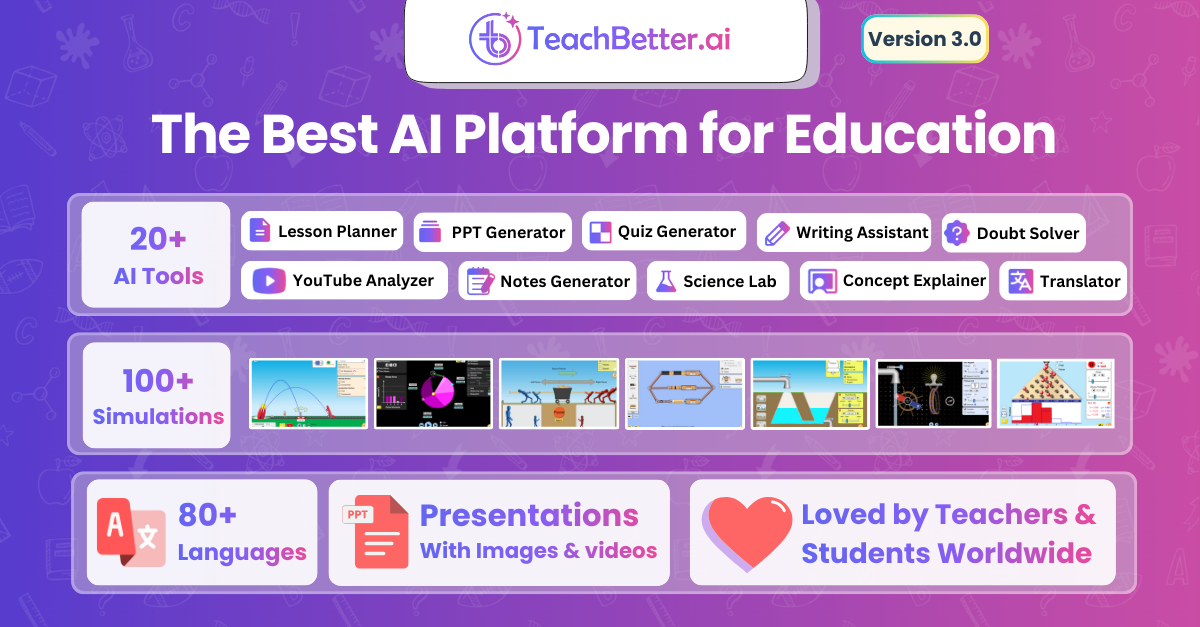
This update introduces 100+ interactive simulations and a media-rich presentation generator. It also adds an enhanced concept explanation engine, upgraded high-performance AI models, and a refined user experience. Together with the tools teachers already use, these additions make TeachBetter.ai one of the most powerful and future-ready AI platforms for modern classrooms.
Interactive Science and Math Simulations Now Inside TeachBetter.ai
One of the most transformative additions to the platform is the introduction of 100+ fully interactive simulations. These simulations help students visualize and experiment with Science and Mathematics concepts. These simulations allow learners to move beyond static textbook explanations and observe how real-world phenomena behave when variables change. Teachers can now demonstrate topics such as energy transfer, motion, graphs, fractions, electricity, magnetism, forces, and geometry. They can do this simply by selecting a simulation and interacting with it.
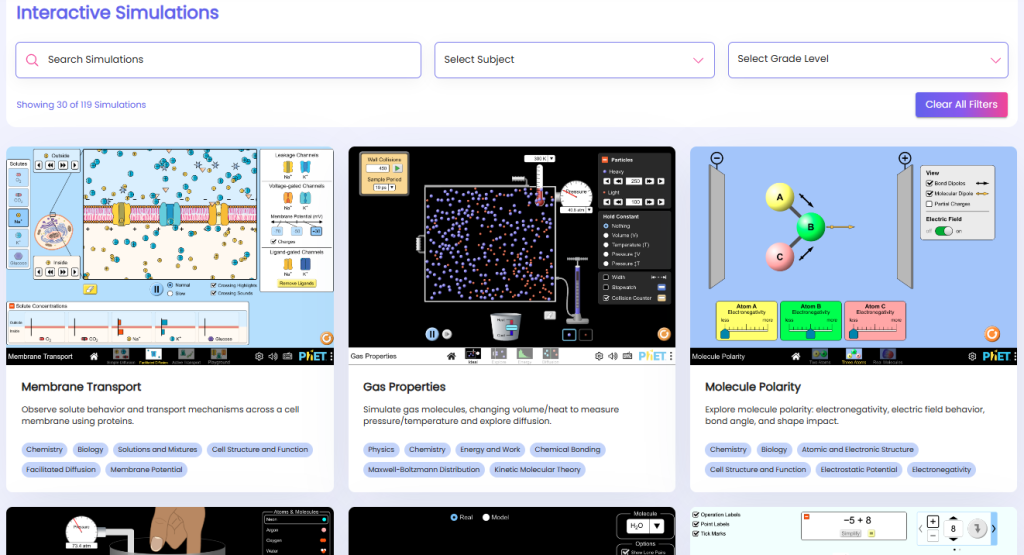
The experience is intentionally simple and intuitive. You can search for a concept, choose a subject, select a grade level, and access interactive demonstrations instantly. This makes it easier for students to grasp abstract ideas, encourages curiosity-driven exploration, and brings hands-on learning right into the classroom. Whether you're teaching a new chapter or helping a student revise at home, simulations make learning visual. They turn complex theory into something students can see, manipulate, and understand instantly.
How Simulations Support Learning
Interactive simulations enable students to:
- Experiment with variables
- Observe cause-and-effect relationships
- Explore real-world phenomena
- Visualize abstract ideas more clearly
- Strengthen conceptual understanding
Teachers can quickly find simulations by topic, subject, or grade, making it effortless to match the right interactive experience to the lesson. Whether it’s understanding the behaviour of sound waves, exploring the motion of objects, investigating the interaction of forces, or visualizing fractions and geometry, these simulations transform passive learning into active discovery.
A More Advanced Presentation Generator—Now with Text, Images, and Videos
Preparing presentations has always been one of the most time-consuming tasks for teachers. The upgraded Presentation Generator in TeachBetter.ai completely transforms that experience. It now produces high-quality, multimedia-rich presentations where every slide is automatically populated with relevant text, images, diagrams, and even videos.
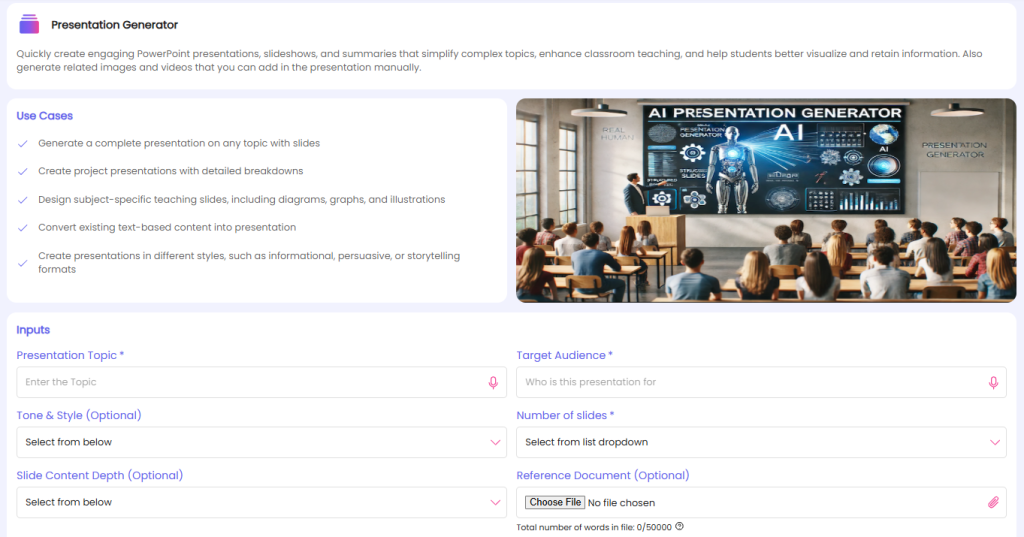
Teachers simply enter a topic and specify the audience. They can choose a tone or presentation style and select the number of slides they want. The tool then builds a complete slideshow—featuring clear explanations, visual elements, real-world examples, activities, discussion ideas, and reinforcement components such as MCQs or reflection questions. If needed, teachers can also upload a reference document to tailor the presentation to their existing material.
This capability not only saves hours of preparation time but also ensures that presentations are consistent, engaging, and visually impactful. Whether you're planning a lesson, creating a project presentation, or converting handwritten notes into a teachable format, the Presentation Generator delivers a ready-to-use deck within minutes.
What Makes This Presentation Generator Special
Each presentation now includes:
- Automatically generated text
- Relevant images and diagrams
- Integrated videos
- Real-world examples
- Activities, experiments, and discussion prompts
- Reinforcement elements such as MCQs or reflection questions
This allows teachers to create lesson presentations, project slideshows, chapter summaries, and multimedia conversions of existing notes in a fraction of the usual time.
Flexible Inputs for Custom Presentations
To ensure full control, teachers can customise presentations using:
- Presentation topic
- Target audience
- Tone and style
- Number of slides
- Desired content depth
- Optional reference document
- Optional engagement elements
- Optional reinforcement elements
This flexibility ensures that every presentation reflects the teacher’s intent, while automating the most time-consuming parts of creation.
Smarter Concept Explanations With Visual Support
Understanding a topic becomes far easier when explanations are supported by visuals. The improved Concept Explainer on TeachBetter.ai now incorporates images, diagrams, and relevant videos to make academic concepts clearer and more memorable. Instead of long blocks of text, explanations now include visual cues that help students connect ideas to real-life situations.
Whether it’s a Science topic like photosynthesis, a Math concept such as fractions, or a theme in Social Science, the new explanation format breaks the concept down step-by-step while adding visuals wherever needed. This aligns the tool with how children learn best — through a combination of text, imagery, and guided reasoning.
The Concept Explainer has undergone one of its most significant enhancements. Explanations are now supported by diagrams, illustrations, and curated video references that make it easier for students to internalize complex ideas, especially those involving multiple steps or abstract thinking.
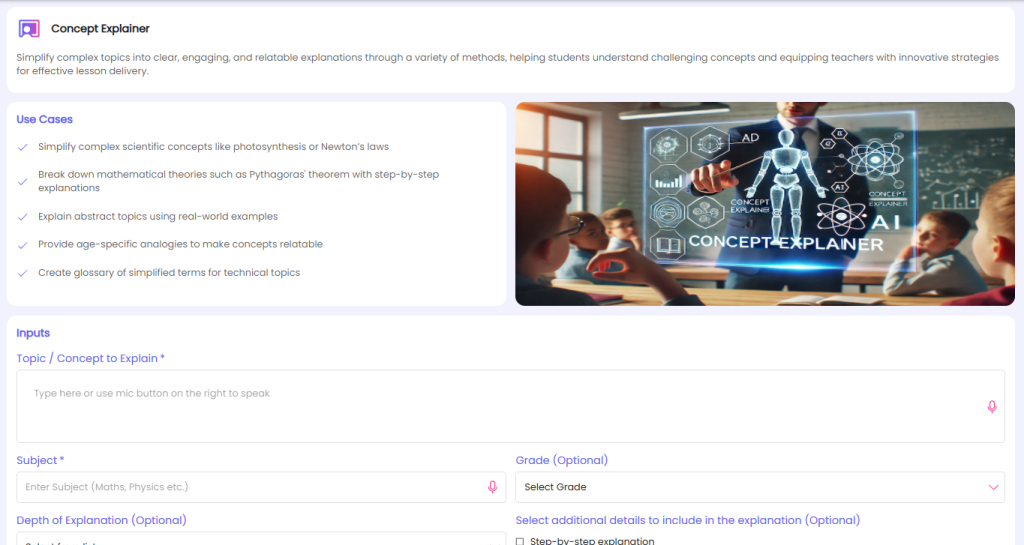
The upgraded explainer ensures that each topic is presented using:
- Simple, age-appropriate language
- Visual aids that reinforce understanding
- Real-life examples and applications
- Story-based analogies
- Optional multimedia support
This approach helps students understand not only what a concept is, but also why it matters and how it applies in the world around them.
Read more: Integrating AI Tools into Lesson Planning: A Step-by-Step Guide for Modern Educators
New & latest AI Models for Faster and More Accurate Outputs
To support these advanced features, TeachBetter.ai now runs on upgraded AI models that generate responses significantly faster than before. These new models produce clearer explanations, more accurate examples, cleaner language, and improved coherence across every tool. Whether you're generating a worksheet, refining text, crafting a story, or summarizing content, the upgraded AI ensures that outputs are sharper, more structured, and better aligned with curriculum expectations.
This improvement is noticeable across the entire platform — from lesson plans and activities to question banks, doubt solving, writing tasks, and creative resources. Tasks that previously took several seconds now feel almost instant, and the overall quality of the content is more consistent and reliable.
With this update, teachers can expect:
- Faster generation speeds
- Higher accuracy in concept reasoning
- Better alignment with grade-level requirements
- Cleaner, well-formatted output
- More polished and structured answers
- Improved consistency in longer content
Whether you're creating worksheets, drafting passages, analyzing videos, or preparing unit summaries, the upgraded AI models enhance both the speed and quality of everything you produce.
A Cleaner, More Intuitive User Experience Across the Platform
Alongside the new tools and upgraded AI models, the entire TeachBetter.ai interface has been redesigned to offer a smoother, faster, and more intuitive experience. The layout is cleaner, navigation between tools is more direct, and content previews load noticeably quicker. Teachers can now switch between tools, access their saved work, revisit previously generated content, and track their creations with greater ease — all without feeling overwhelmed.
These UI and UX improvements reduce cognitive load for both teachers and students, making the platform more accessible and enjoyable for users of all age groups. Whether you use TeachBetter.ai occasionally or rely on it every day, the updated design ensures that your workflow feels natural, fluid, and uninterrupted.
The redesigned interface brings several enhancements, including:
- More intuitive tool layouts
- Cleaner, modern page designs
- Faster transitions between screens
- Improved spacing and typography for readability
- Easier access to created content and history
- A more responsive experience across devices
These updates ensure that teachers spend less time navigating menus and more time focusing on what truly matters — teaching and engaging their students.
Existing TeachBetter.ai Capabilities — Now Even More Powerful
While the new features bring a major leap forward, the foundation of TeachBetter.ai remains the extensive suite of tools that thousands of teachers rely on every day. These tools continue to support core classroom needs, and with improved AI models and cleaner formatting, they now deliver results that are faster, more accurate, and more structured than ever.
- Lesson Planner: Create detailed, curriculum-aligned lesson plans tailored to any grade or topic. Each plan includes learning objectives, teaching steps, examples, activities, assessments, and closure strategies—saving teachers hours of preparation time.
- Activity and Project Generator: Generate hands-on activities, classroom projects, experiments, and group tasks that encourage exploration, creativity, and deeper engagement with concepts.
- Quiz and Worksheet Generator: Produce ready-to-use worksheets and question banks across formats such as MCQs, short answers, long answers, true/false, fill-in-the-blanks, and HOTS questions. Ideal for classwork, homework, assessments, and revision.
- Creative Resource Generator: Build flashcards, poems, riddles, stories, posters, jingles, and other creative learning materials that help students absorb concepts in enjoyable and memorable ways.
- Doubt Solver: Students can ask questions and receive clear, age-appropriate explanations in a safe and distraction-free environment.
- Chat With Documents: Upload textbooks, notes, PDFs, or worksheets and ask questions directly from the content. The AI reads the document and provides contextual answers, explanations, and summaries.
- YouTube Video Analyzer: Paste any educational video link and instantly receive structured notes, summaries, questions, and key learning points—without students having to browse YouTube.
- Writing Assistant: Create essays, letters, passages, scripts, articles, reports, and other forms of written content instantly. Perfect for classroom tasks, assignments, and school projects.
- Text Analyzer & Enhancer: Improve clarity, tone, grammar, or structure of any passage, or translate content into multiple languages while preserving meaning and grade-appropriate vocabulary.
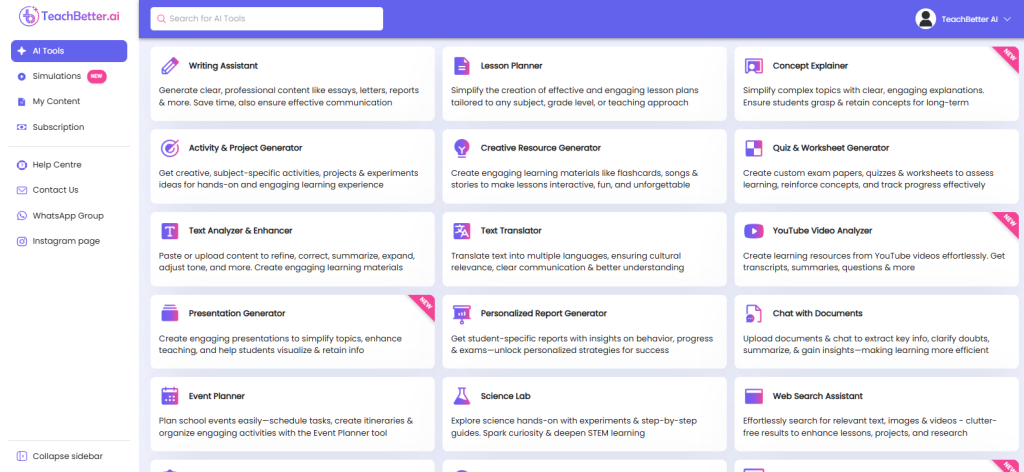
All of these tools now benefit from upgraded AI models that deliver cleaner language, better structure, and quicker generation times—making TeachBetter.ai an even more reliable companion for classroom teaching and student learning.
Closing Thoughts: A More Interactive, Visual, and Intelligent Learning Experience
The latest upgrades bring TeachBetter.ai closer than ever to the classroom of the future—one that is interactive, visual, personalized, and powered by thoughtful technology. With simulations that bring Science and Math to life, presentations that assemble themselves, smarter concept explainers, faster AI models, and a refined user experience, teachers now have an extraordinary level of support at their fingertips.
Our goal remains unchanged: to simplify teaching, amplify learning, and empower every educator to deliver meaningful, engaging lessons without the burden of lengthy preparation. TeachBetter.ai will continue to evolve with more interactive tools, student-focused features, and school-level automation. This marks the beginning of a more connected, intelligent, and inspiring learning ecosystem.
These new capabilities move TeachBetter.ai beyond basic content generation and into the realm of truly interactive learning. With simulations that encourage experimentation, presentations that communicate visually, concept explainers that deepen understanding, and AI models that work faster and more reliably than ever, TeachBetter.ai is shaping the future of AI-assisted education.
Teachers now have everything they need to create impactful learning experiences, while students benefit from deeper understanding through visual, hands-on, multisensory learning. This evolution is just the start, and TeachBetter.ai will continue building tools that make education more meaningful, more accessible, and more engaging for every learner.

Vipin Kumar, Co-Founder, TeachBetter.ai
Vipin Kumar is building TeachBetter.ai to create intuitive AI tools that simplify teaching and enhance learning outcomes. With prior experience at global technology companies, he brings a deep understanding of scalable systems, user needs, and practical digital solutions. His mission is to make AI adoption in education easy, affordable, and truly impactful for teachers everywhere. He is committed to creating AI solutions that save time, boost creativity, and empower educators to focus on what matters most—teaching.