Concepts in Real Life: Helping Students Discover Where Classroom Learning Meets the Real World
Vipin Kumar
|
 23 November, 2026
A student may be able to repeat a definition, remember a formula or reproduce the steps of a process. Real-life applications of concepts help students understand where classroom learning meets the world around them. A student may be able to repeat a definition, remember a formula or reproduce the steps of a process. But an important question often remains unanswered: Where does this concept appear in real life? But an important question often remains unanswered: Where does this concept appear in real life?
Students naturally want to understand why they are learning something. When that connection is missing, a topic can feel like information that must be memorised for an assessment. When the connection becomes visible, the same topic can become a way of understanding the world.Real-life connections also support meaningful and contextual learning. According to UNESCO, quality education should help learners develop knowledge and skills that they can apply in different contexts and situations.
Angles are no longer limited to diagrams when students notice them in road turns, clock hands and moving objects. Acids and bases become more relevant when connected to food, digestion, agriculture and household substances. Artificial intelligence becomes less abstract when students examine recommendations, facial recognition and automated decisions.
This is the purpose behind Concepts in Real Life, a new visual-learning capability on TeachBetter.ai.
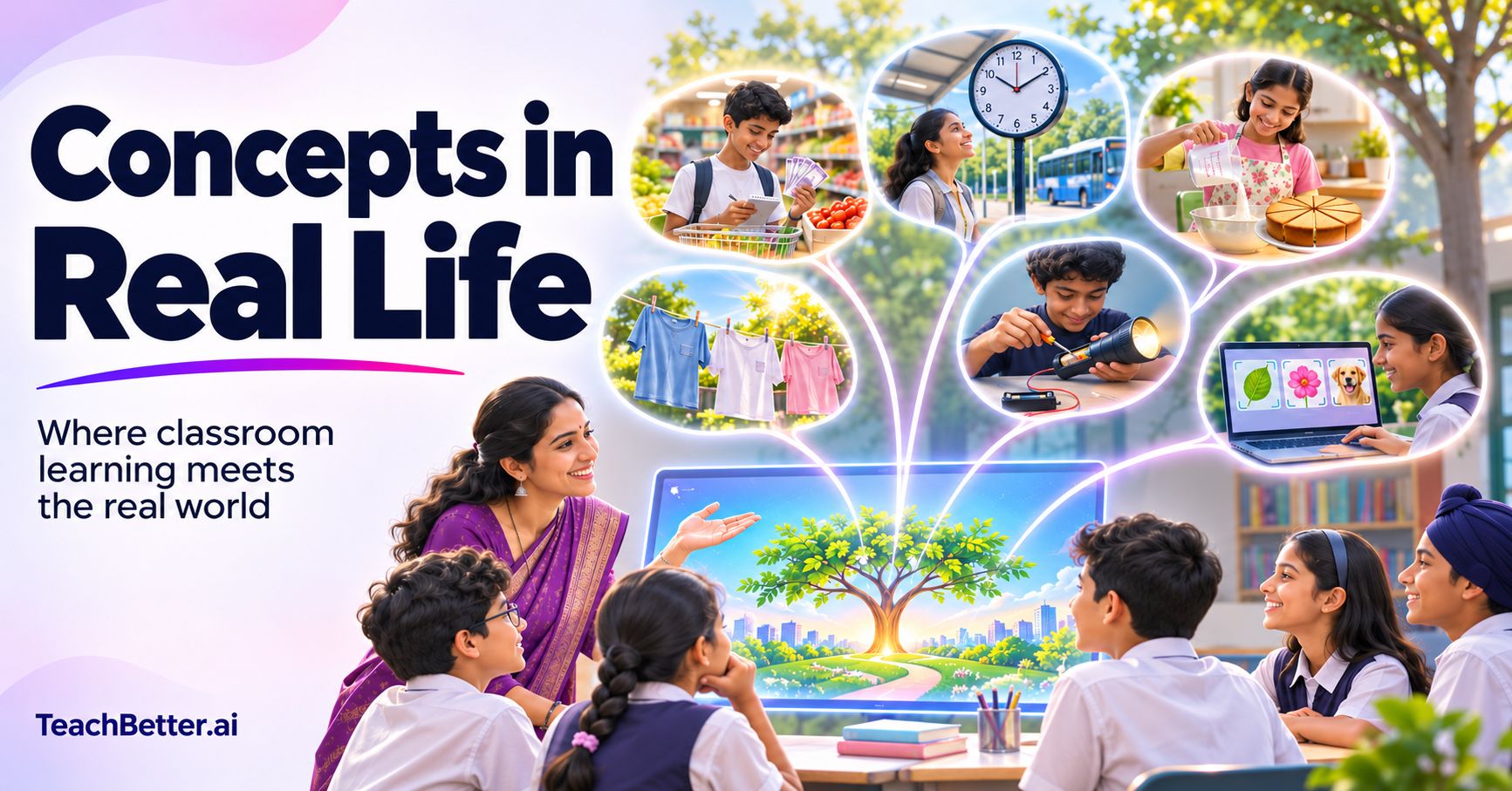
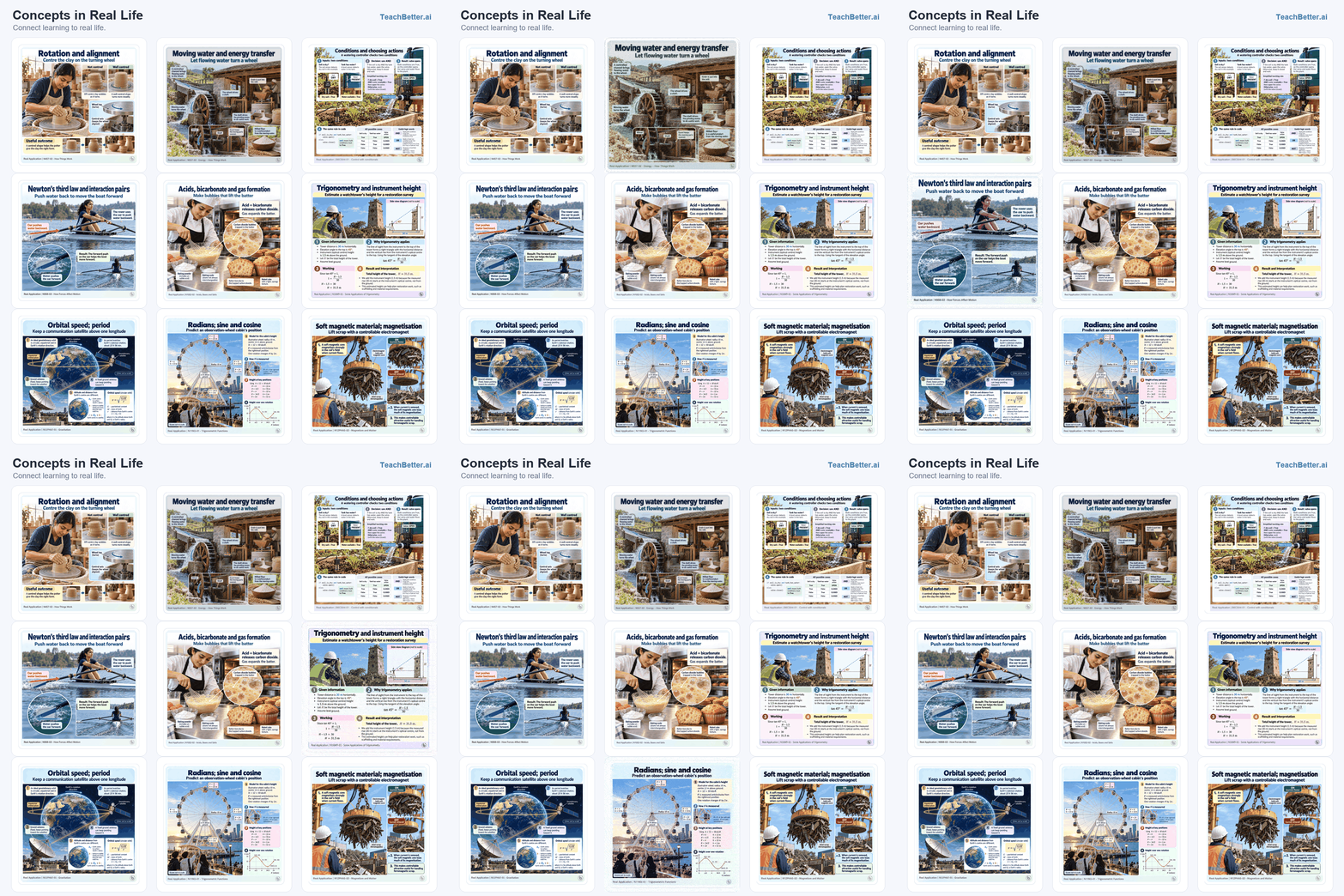
Concepts in Real Life gives teachers access to a growing collection of ready-to-use educational visuals that connect classroom topics with everyday examples and practical applications. Teachers can search for a topic, select a relevant visual, personalise it with their school logo, school name and class details, and then download or share it with students.
It helps teachers answer the question students may not always ask aloud: “Why does this concept matter outside the classroom?”
The Relevance Gap in Classroom Learning
Classroom teaching often has to cover a significant amount of content within a limited time. Teachers introduce definitions, demonstrate procedures, explain diagrams, solve examples and prepare students for assessments.Real-life applications of concepts bridge the gap between theoretical knowledge and practical understanding.
Within these demands, the connection between a concept and its wider application can sometimes receive less attention than it deserves.
A chapter may explain electricity through circuits, symbols and formulas without giving students enough opportunities to think about the appliances they use, the power they consume or the safety systems behind them. A mathematics lesson may explain angles accurately, yet students may not immediately recognise those angles in movement, navigation, construction or design.
This creates what can be called a relevance gap: the distance between knowing what a concept means and understanding where it operates.
That gap affects more than engagement. It can influence whether students are able to:
- Recognise the same concept in an unfamiliar situation
- Explain why the concept is useful
- Apply their knowledge to a practical problem
- Connect ideas across subjects
- Retain learning beyond the immediate assessment
TeachBetter.ai’s Concepts in Real Life capability is designed to help teachers reduce this gap. Instead of spending time searching across multiple websites for appropriate examples or designing visual material from the beginning, teachers can access educational visuals developed specifically to connect concepts with life.
The resource does not replace a teacher’s explanation. It gives the explanation a stronger context.
Why Real-Life Connections Improve the Learning Experience
Real-life connections give students a familiar entry point into an unfamiliar or abstract idea.
A student may initially struggle with the language of rotation, resistance, algorithms or ecosystems. However, that student may already understand what it means to turn a steering wheel, use an electrical appliance, receive a recommendation online or separate waste at home. Real-life applications of concepts give students familiar examples to understand unfamiliar topics.
The teacher can use that familiar experience as a bridge. This bridge supports learning in several ways.
It gives students a reason to pay attention
Students are more likely to become curious when a topic helps explain something they recognise. A question such as “Why do some appliances consume more electricity than others?” creates an immediate reason to understand power and energy.
It makes abstract ideas easier to discuss
Some concepts are difficult to imagine through words alone. A visual showing where the concept appears can make the explanation more concrete and provide a common reference point for the entire class.
It supports memory through meaningful association
Students may remember a concept more effectively when it is connected with a recognisable situation. The example gives the academic idea an additional mental anchor.
It encourages students to transfer knowledge
The goal is not simply to remember the example shown in the visual. It is to help students recognise that the same principle can appear in other settings.
TeachBetter.ai makes these connections available as structured visual resources. Teachers can therefore focus on the discussion, questioning and explanation around the visual rather than spending most of their preparation time creating it.
More Than Adding an Example to an Explanation
Connecting learning to life does not simply mean mentioning one everyday example at the end of a lesson.
A strong real-life connection should help students understand three things:
- Where the concept appears
- How the concept operates
- Why the concept matters in that situation
For example, showing an electrical appliance during a lesson on electricity may attract attention. A richer connection would help students examine the appliance’s power rating, energy use, electrical safety and relationship with the wider circuit.
Similarly, showing a market during a mathematics lesson creates a familiar setting. The learning becomes deeper when students identify quantities, prices, measurements, patterns, comparisons and calculations within that setting. Effective real-life applications of concepts show where an idea appears and how it operates.
The visual should not merely illustrate the topic. It should reveal the concept at work.
This principle shapes the Concepts in Real Life collection on TeachBetter.ai. The visuals are intended to help teachers move from an academic idea to recognisable applications while keeping the learning objective clearly visible.
Concepts in Real Life: A New Visual Dimension on TeachBetter.ai
TeachBetter.ai supports teachers across different stages of lesson preparation and classroom delivery. With Concepts in Real Life, the platform adds a focused way to help teachers establish relevance. TeachBetter.ai makes real-life applications of concepts easier to introduce through ready-to-use educational visuals.
The capability is built around a straightforward teaching need: “I am teaching this concept. How can I show students where it appears in life?”
Teachers can search for the topic they are teaching and explore matching visuals from the ready-to-use collection. The resource can then be incorporated into the lesson in the form that best suits the classroom.
A teacher may:
- Display it while introducing the topic
- Use it to support a classroom explanation
- Ask students to interpret its examples
- Include it in a presentation or revision resource
- Share it before or after a lesson
- Use it as the starting point for an application-based activity
- Ask students to find additional examples beyond the visual
Each selected resource can also be personalised with the school logo, school name and class details. This allows teachers to turn a centrally available visual into a resource that feels connected to their own classroom.
The result is a practical combination of quality and flexibility: the teacher begins with a rich, well-designed visual and adds the context, questioning and explanation needed by the class.
From “What Is It?” to “Where Can I See It?”
Many classroom explanations begin with the question:
What is this concept?
That question is essential. Students need accurate definitions, models, vocabulary and procedures. Concepts in Real Life adds two further questions:
Where can I see it? How is it being used?
Consider angles. A formal explanation may introduce acute, right, obtuse and reflex angles. Real-life observation then helps students identify angles in clock hands, doors, road turns, sports movements, buildings and tools.
The classroom explanation gives students the language of geometry. The real-world examples help them recognise geometry beyond the page. Real-life applications of concepts encourage students to recognise familiar principles in different situations.
This movement from definition to recognition is important because genuine understanding is not limited to reproducing the example used in a textbook. Students should gradually be able to identify a concept when its appearance, setting or purpose changes.
TeachBetter.ai supports that transition by making real-life applications visible through an organised educational resource. Teachers can then use the visual to ask students not only what they see, but also what principle explains it.
How Teachers Can Use Concepts in Real Life on TeachBetter.ai
The feature is designed to fit naturally into existing teaching practice. Teachers do not need to restructure an entire unit or introduce a separate technology-based activity. Teachers can use real-life applications of concepts to introduce topics and encourage classroom discussions.
A simple workflow can begin with five steps.
1. Search for the topic: The teacher starts with the concept being taught—such as angles, electricity, acids and bases, the environment or machine learning.
2. Explore the available real-life visuals: The teacher reviews the matching resources and selects the visual most relevant to the class level, lesson objective and available time.
3. Personalise the resource: The selected visual can be personalised with the school logo, school name and class details. This creates a classroom-ready resource without requiring the teacher to redesign it.
4. Download or share it: The teacher can download the visual for classroom use or share it with students as part of their learning or revision material.
5. Build the teaching interaction around it: The visual can become the foundation of an explanation, discussion, observation activity, contextual question or revision exercise.
This final step is important. The value of the feature lies not only in the visual itself, but also in the conversations and learning tasks that teachers build around it.
Eight Concepts That Become More Meaningful Through Real-Life Connections
The strongest real-life connections often come from activities students already observe—shopping, planning a journey, preparing food, measuring quantities or using everyday devices. TeachBetter.ai’s Concepts in Real Life visuals turn these familiar situations into structured learning opportunities.
The following examples are broad enough to be understood across different contexts. Each one begins with an everyday situation and reveals the mathematics, science or technology operating within it.
1. Managing Money Within a Budget
Money gives students an immediate reason to use addition, subtraction, comparison and decision-making. Whether someone is buying school supplies, planning a meal or choosing between products, the amount available creates a spending limit. Real-life applications of concepts help students use mathematics when managing a shopping budget.
The TeachBetter.ai visual presents a simple shopping situation in which different items must be compared against a fixed budget. Students can determine what they can afford, calculate the total cost and understand why certain choices exceed the available amount. The situation also introduces the difference between wanting an item and being able to include it within a budget.
Teachers can extend the example by giving students a different amount or changing the prices. Students can then find multiple combinations, compare their choices and explain how they made their decisions. This turns basic arithmetic into practical financial thinking.
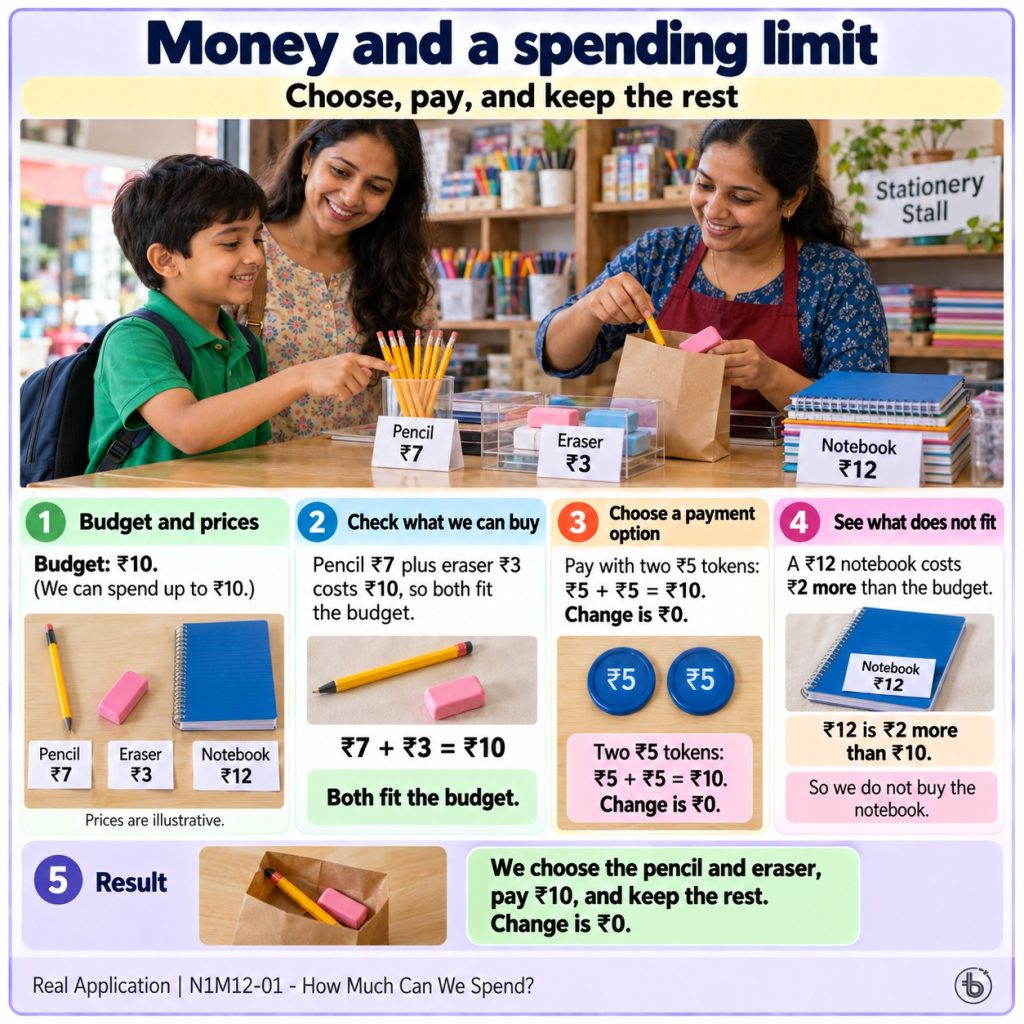
Using addition and comparison to make purchasing decisions within a budget
Link: https://myspace.teachbetter.ai/view/resource/bc3835b6-ec7b-4047-8552-0a23c95ddba2
2. Reading Time and Planning a Journey
Time is part of almost every daily activity. People use it to reach school or work, follow timetables, attend appointments, catch transport and decide when to begin a task.
The TeachBetter.ai visual connects 12-hour and 24-hour time with a railway departure board. Students must read the departure time, convert it into a familiar format and work backwards to determine when they should arrive at the station. The concept is therefore not presented as a standalone conversion exercise; it becomes part of planning a journey successfully. Real-life applications of concepts make time conversion meaningful through everyday travel planning.
Teachers can adapt the situation by changing the departure time, travel duration or required arrival buffer. Students can also create their own timetable-based questions using buses, trains, school periods or daily routines. This helps them understand that reading time and calculating with time are practical skills used to organise real activities.
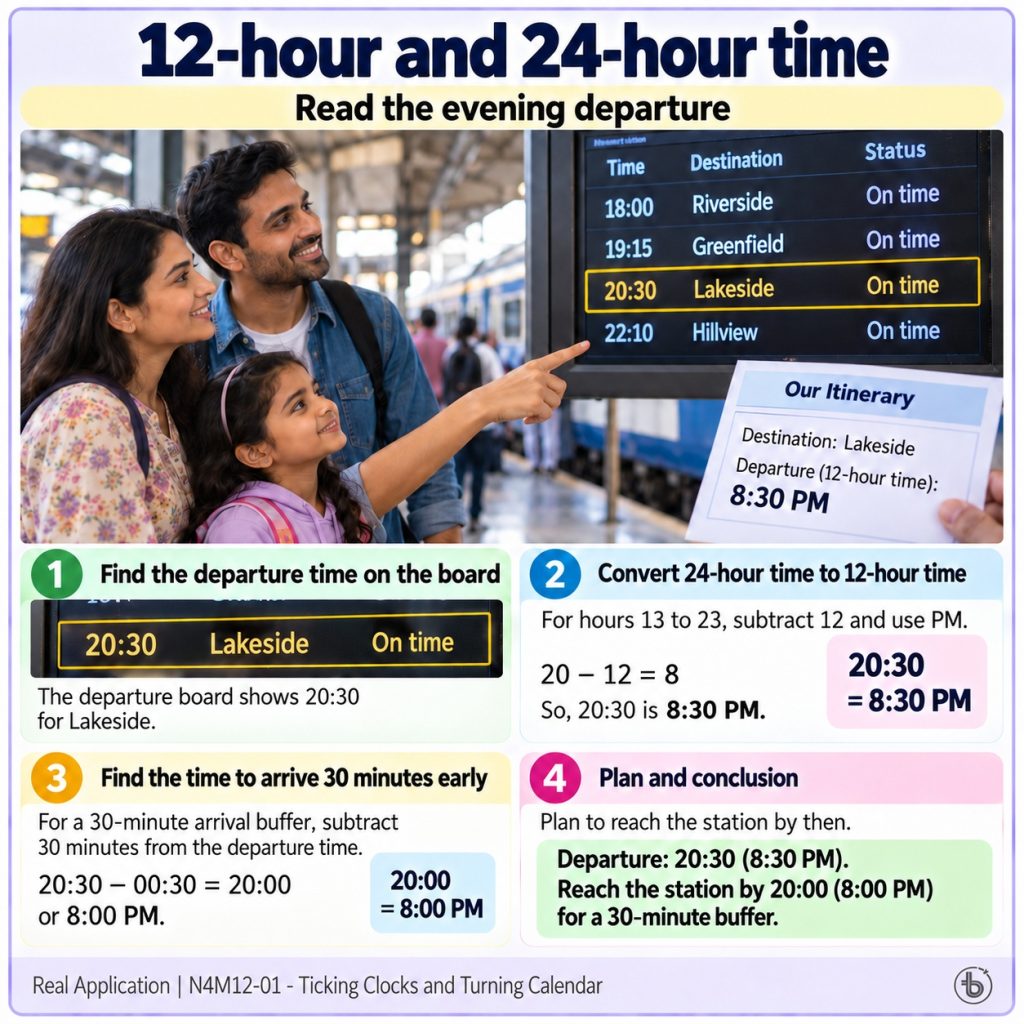
Converting 24-hour time and planning an early arrival for a train journey
Link: https://myspace.teachbetter.ai/view/resource/e1e7bd27-c997-4325-bcec-be88ed8c21d4
3. Using Fractions While Cooking
Fractions become easier to understand when students see them as quantities rather than only numbers written above and below a line. Cooking provides a familiar setting in which whole cups, half-cups and other fractional measurements must work together.
The TeachBetter.ai visual shows how a required quantity can be measured when the available measuring tool is smaller than the total amount needed. Students can see that three half-cup measures make one and a half cups. The relationship between equivalent fractions and mixed numbers becomes visible through an action that could take place in any kitchen. Cooking demonstrates how real-life applications of concepts make fractions easier to understand.
Teachers can extend this example by changing the recipe quantity, doubling or halving a recipe, or asking students to use a different measuring cup. The activity connects fractions with estimation, equivalence and accurate measurement while showing why fractional thinking is useful.
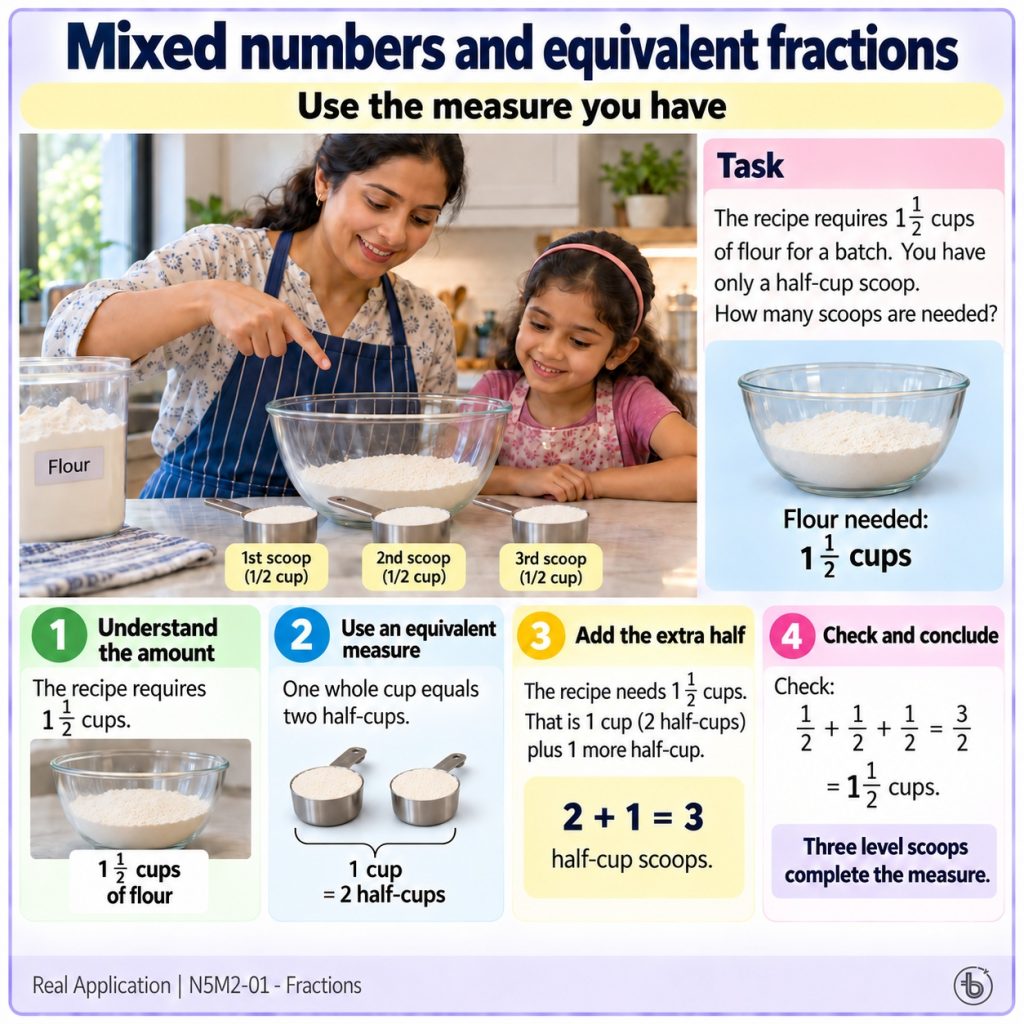
Using equivalent fractions and mixed numbers to measure ingredients for a recipe
Link: https://myspace.teachbetter.ai/view/resource/24b6da75-5e65-4483-85f4-53a724888b81
4. Measuring Weight and Capacity
Weight and capacity appear in shopping, cooking, transport, packaging, delivery and household use. Students encounter litres, millilitres, kilograms and grams regularly, but may not always understand how the units relate. Real-life applications of concepts help students understand measurement through familiar activities.
The TeachBetter.ai visual connects capacity with filling bottles and mass with checking a load limit. It demonstrates how quantities can be converted into a common unit before they are divided, added or compared. Students see that unit conversion is not simply a written procedure—it prevents errors when measuring products, combining packages or checking whether something is within a safe limit.
Teachers can build on the visual by asking students to calculate how many smaller containers can be filled from a larger quantity, compare package weights or determine the unused capacity of a container or vehicle. This makes measurement relevant to familiar activities while strengthening mathematical accuracy.
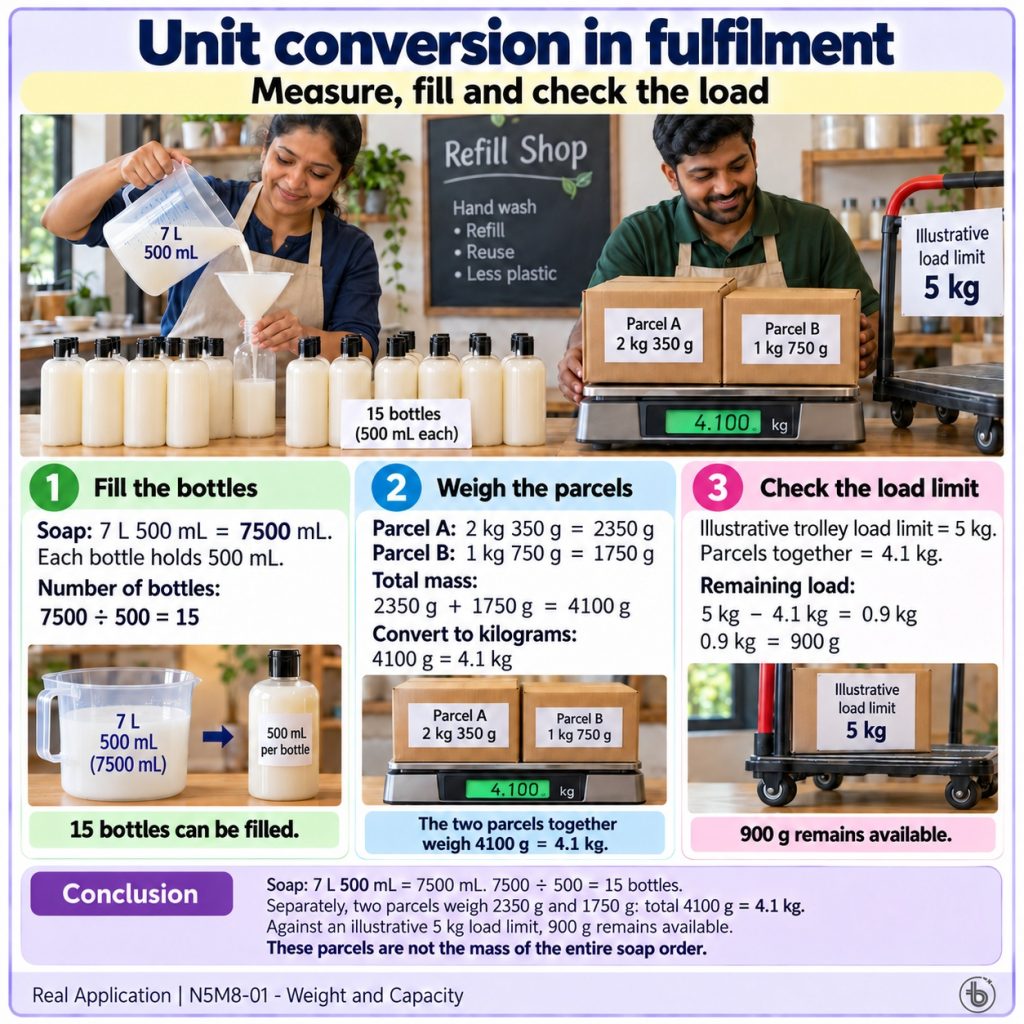
Converting units of weight and capacity while filling containers and checking load limits
Link: https://myspace.teachbetter.ai/view/resource/b173548a-7ffc-4d6f-813a-c247a5f476b6
5. Choosing a Varied and Balanced Meal
Food is a universal context through which students can explore health, nutrition and everyday decision-making. A meal may satisfy hunger, but the variety of ingredients determines whether it provides different nutritional benefits.
The TeachBetter.ai visual shows how grains, pulses, vegetables and fruits contribute different things to a meal. Rather than labelling one food as universally “good” and another as “bad,” it highlights the value of variety and explains why one food group cannot provide everything the body needs.
Teachers can use the visual to discuss familiar meals from different homes and regions. Students can identify the food groups represented, suggest what could be added for greater variety and explain the purpose of different ingredients. The activity respects diverse food cultures while introducing the wider principle of balanced eating.
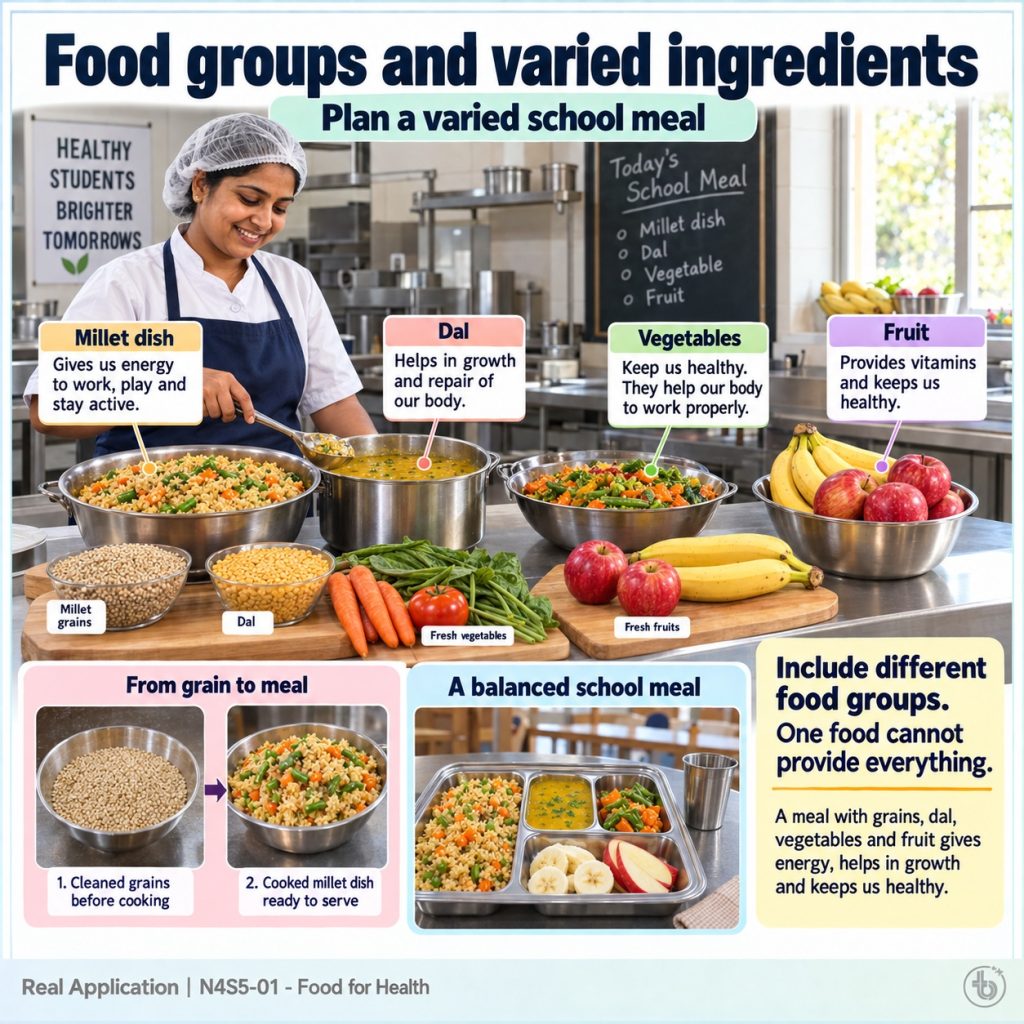
Combining grains, pulses, vegetables and fruits to create a varied meal
Link: https://myspace.teachbetter.ai/view/resource/b173548a-7ffc-4d6f-813a-c247a5f476b6
6. Understanding Why Clothes Dry Faster
Evaporation can seem invisible because students cannot directly watch individual water particles leave a wet surface. Drying clothes provides an everyday situation in which the effects of evaporation can be observed clearly. Drying clothes demonstrates how real-life applications of concepts explain scientific processes.
The TeachBetter.ai visual explains how exposed surface area, airflow and humidity affect drying. Clothes spread apart generally dry faster than clothes bundled together because more wet surface is exposed. Moving air carries water vapour away, while humid conditions can slow the process.
Teachers can ask students to predict where clothes would dry fastest and justify their answers using the visual. They can compare indoor and outdoor drying, sunny and humid conditions, or spread-out and folded fabric. A familiar household observation therefore becomes a way to reason scientifically about evaporation and environmental conditions.
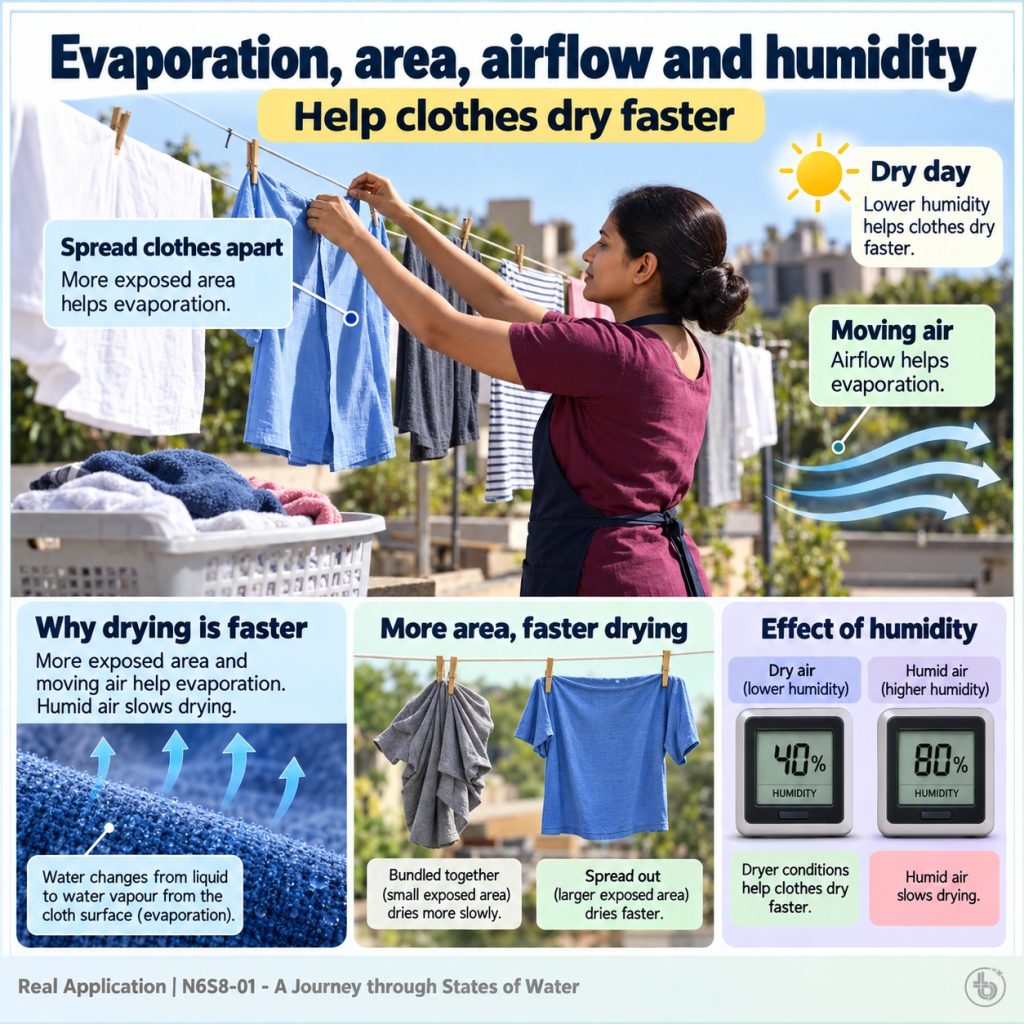
How surface area, moving air and humidity affect the drying of clothes
Link: https://myspace.teachbetter.ai/view/resource/9fd8cc98-9411-4569-9dd4-6140f9a34b24
7. Finding a Break in an Electrical Circuit
Students use torches, toys, switches and battery-powered devices regularly. When one of these devices stops working, the problem often becomes a practical example of how an electrical circuit operates.
The TeachBetter.ai visual uses a battery torch to show that current flows only when there is a complete conducting path. A disconnected contact creates a break in the circuit, preventing the lamp from lighting. Restoring the connection completes the path and allows the device to work. Real-life applications of concepts help students understand how electrical circuits work in everyday devices.
Teachers can use the example to help students identify the roles of the battery, terminals, switch and conducting path. They can also ask students to predict other reasons a torch might fail, while reinforcing that electrical investigations must be carried out with appropriate supervision and safe, low-voltage materials.
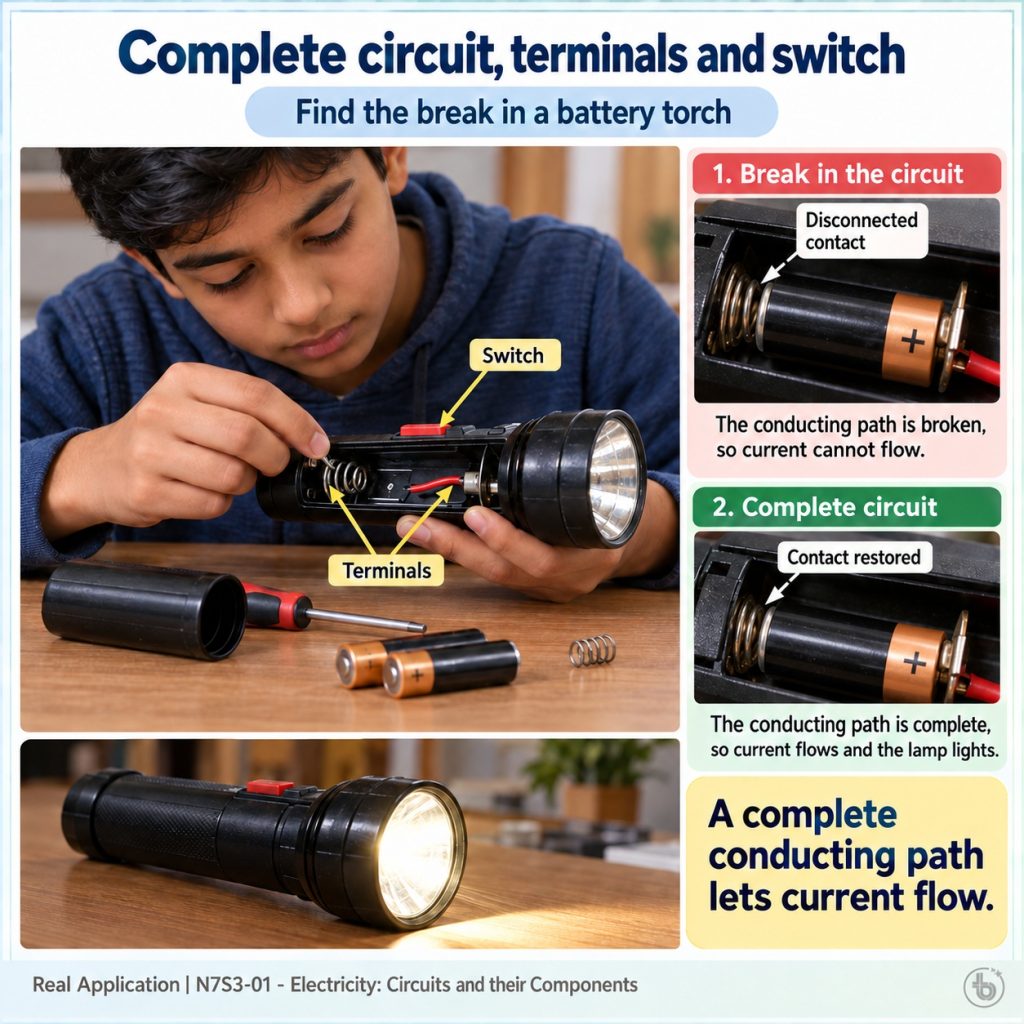
Understanding a complete electrical circuit by identifying a break inside a torch
Link: https://myspace.teachbetter.ai/view/resource/1764fa0c-1e74-45b4-8757-a3d71fbd75c7
8. Recognising Patterns and Making Decisions
People classify objects constantly. They identify materials, group similar items and use observed features to decide where something belongs. Artificial intelligence also uses patterns and labelled examples to make predictions, although the process operates through data rather than human intuition alone.
The TeachBetter.ai visual introduces this idea through familiar objects made from metal, paper and plastic. A system examines features from labelled examples and uses the learned patterns to suggest a label for a new object. The example makes the basic logic behind pattern recognition understandable without requiring advanced programming knowledge.
Importantly, the visual also shows why a prediction should be checked. Objects can appear similar while being made from different materials, and predictions may be incorrect if the examples used for learning are incomplete or wrongly labelled. Teachers can use this to begin a wider discussion about how AI learns, why data quality matters and why human review remains important.
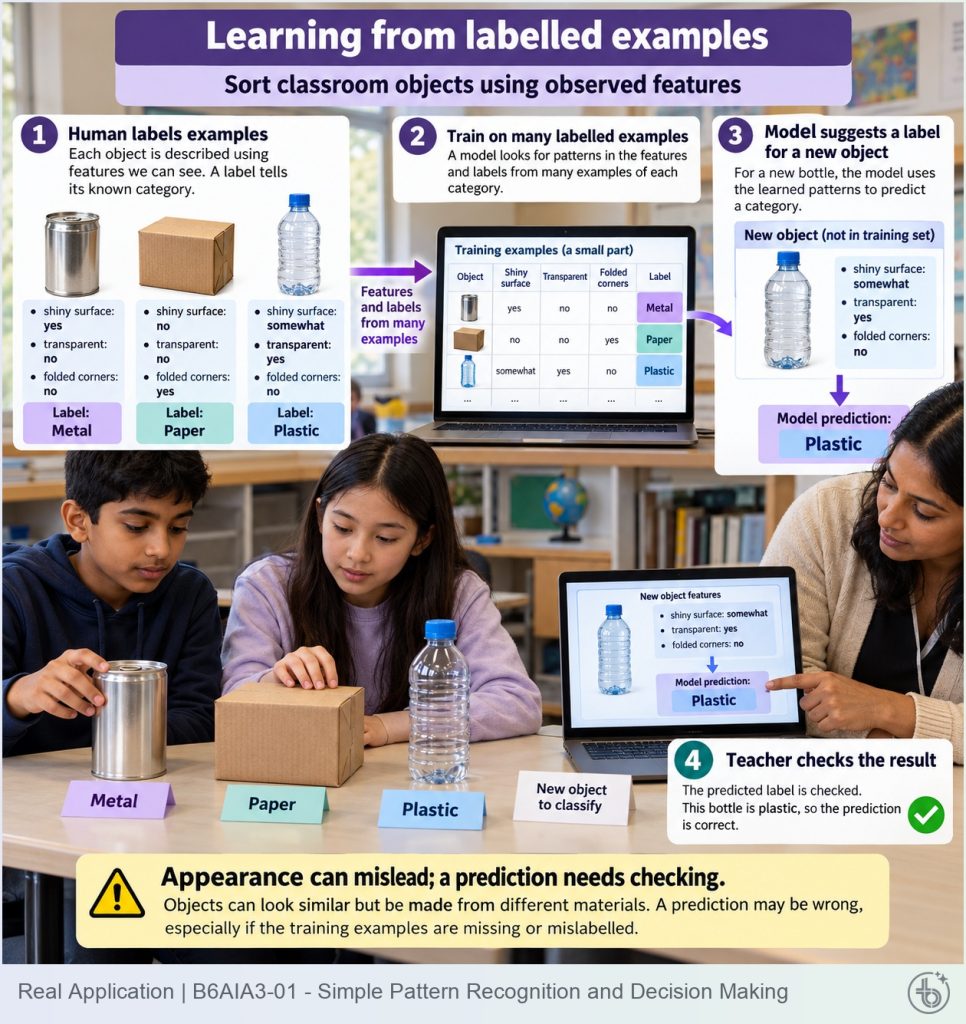
Using labelled examples and observable features to recognise patterns and classify objects
Link: https://myspace.teachbetter.ai/view/resource/4d9cc68d-02e2-4bc2-8b63-ed254ede85a7
Using Concepts in Real Life at Different Stages of a Lesson
A real-life visual does not have to be shown only after the teacher has completed the explanation. TeachBetter.ai resources can support learning before, during and after the main lesson.
Before teaching: Begin with curiosity
Display the visual without explaining every label or application. Give students time to observe and ask:
- What do you notice?
- Which examples seem connected?
- What do you think today’s topic might be?
- What questions does the visual raise?
This approach activates prior knowledge and gives the teacher a sense of what students already understand.
During teaching: Make the explanation concrete
As the formal concept is introduced, return to different parts of the visual. Connect vocabulary, formulas or processes with the applications shown.
The resource becomes part of the explanation rather than an additional image placed beside it.
After teaching: Check whether students can apply the idea
Ask students to explain one of the applications in their own words. They can identify the principle involved, describe how it operates and suggest another example.
This helps the teacher see whether students have understood the concept or only remembered the classroom explanation.
During revision: Use the visual as a retrieval prompt
Show an application and ask students to recall the academic idea behind it. Students can use the visual to rebuild the concept rather than merely rereading a definition.
For homework: Extend observation beyond the classroom
Students can select one application and find a related example at home or in their community. The following lesson can begin with students sharing what they observed.
Turning One TeachBetter.ai Visual into a Complete Classroom Activity
A single visual can become the foundation of a short discussion or a more detailed learning task.
A practical classroom sequence could be:
- Observe: Give students time to study the visual carefully.
- Identify: Ask them to name the concepts or patterns they recognise.
- Connect: Link their observations with the formal classroom concept.
- Explain: Invite students to describe how the concept operates.
- Extend: Ask them to suggest another real-life example.
- Apply: Present a new situation and ask students to use the concept.
- Reflect: Ask which example made the topic clearer and why.
For younger learners, the activity may focus on naming, describing and comparing. Older students can analyse systems, solve contextual problems, evaluate consequences or identify the limitations of an application.
The same TeachBetter.ai resource can therefore support different depths of learning depending on how the teacher uses it.
Better Questions Turn a Visual into a Learning Experience
Displaying a visual can attract attention, but thoughtful questioning turns that attention into understanding.
Teachers can use questions at different levels.
Questions for observation
- What objects, actions or situations can you identify?
- What patterns do you notice?
- Which example is most familiar to you?
- What appears to be happening?
Questions for conceptual understanding
- Which concept explains this example?
- What process is taking place?
- How does the example relate to what we studied?
- Which part of the visual provides evidence for your answer?
Questions for application
- Where else might the same principle appear?
- What would change if one condition were different?
- Can you find an example in your home, school or community?
- How could this knowledge help solve a practical problem?
Questions for evaluation
- Does the concept operate in exactly the same way in every situation?
- What information is missing?
- Are there limitations to this example?
- What risks, consequences or ethical concerns should be considered?
Because the visual remains available as a shared reference point, students with different levels of confidence can enter the discussion at different stages. One student may begin by identifying an object, while another explains the mechanism or evaluates the application.
Supporting Different Learners Without Reducing Academic Depth
Students do not enter a lesson with identical vocabulary, experiences or confidence. A real-life visual provides more than one route into the topic.
Some students may connect first with the familiar setting. Others may respond to the illustrations, labels or relationships between examples. Students who hesitate to answer an abstract question may be more willing to describe something they recognise.
This does not mean making the content less challenging.
The visual establishes a common starting point. The teacher can then increase the depth of questioning. For example, all students may be able to identify an electrical appliance. The discussion can gradually progress towards energy consumption, resistance, circuit design or safety.
TeachBetter.ai allows teachers to begin with a resource that is visually accessible while retaining control over the academic depth of the lesson.
Reducing Preparation Time Without Making Teaching Generic
Teachers frequently build contextual explanations themselves by searching for examples, collecting images, organising information and formatting it into a presentable classroom resource.
This process can be valuable, but it also takes time. It may need to be repeated across multiple topics, classes and subjects.
TeachBetter.ai’s Concepts in Real Life collection gives teachers a prepared foundation. The visual organisation and core examples are already available, allowing the teacher to spend more time on:
- Selecting the most relevant resource
- Planning questions
- Adapting the explanation to the class
- Connecting the visual with local examples
- Designing an application task
- Responding to student misconceptions
The use of a ready-to-use resource does not make the lesson generic. The teacher’s choice of questions, explanations and local connections determines how the resource comes alive in the classroom.
Personalising Visual Resources for the School and Class
A visual resource becomes more relevant when it feels connected to the environment in which students are using it.
TeachBetter.ai allows teachers to personalise selected Concepts in Real Life resources with their:
- School logo
- School name
- Class details
- Other relevant classroom information
This can create consistency across classroom presentations, printed materials, revision resources and visuals shared with students.
Teachers can then extend the prepared resource with examples from their own setting. A visual about time can be linked to the school timetable. An environmental resource can lead into an examination of waste practices on campus. A mathematics visual can be connected with local markets, transport or architecture.
TeachBetter.ai supplies the visual foundation. The teacher brings in the learners, locality and instructional purpose.
What Makes a Real-Life Connection Educationally Strong?
Not every everyday example automatically improves learning. A strong connection should meet several conditions.
The academic link should be clear: Students should be able to understand why the example belongs in the lesson. If the connection is too indirect, it may distract rather than clarify.
The example should be appropriate for the learners: A situation can be authentic but still be too technically complex. Teachers should choose resources that match students’ existing knowledge and readiness.
The visual should focus attention: Too many unrelated facts or decorative elements can compete with the main idea. The concept and its applications should remain easy to identify.
The example should lead back to the concept: Students should be able to explain not only what happens in the situation, but also the principle that makes it happen.
The context should create room for thought: A strong example should encourage students to ask questions, make comparisons or apply the idea elsewhere.
The ready-to-use collection on TeachBetter.ai gives teachers a stronger starting point than an unrelated online image. Teachers can then decide how to frame and extend the resource according to the class.
From Engagement to Transferable Understanding
The purpose of real-life learning is not simply to make lessons more entertaining. Its deeper purpose is to help students transfer knowledge.
Transfer takes place when students recognise that a concept learned in one setting can be applied in another.
A student who understands angles only in a familiar diagram may struggle when the same reasoning appears in navigation, design or movement. A student who understands acidity only as a number on the pH scale may not recognise its relevance to digestion, agriculture or household products.
Real-life applications expose students to variation. The principle remains consistent, but its context changes.
Over time, this can help students develop a more flexible understanding. Instead of asking only, “Which answer am I expected to remember?” students begin asking, “Which idea can help me understand this situation?”
Concepts in Real Life supports this shift by giving teachers visual material through which students can repeatedly practise recognising knowledge in context.
A Connected Teaching Journey Inside TeachBetter.ai
Concepts in Real Life becomes even more valuable when used alongside TeachBetter.ai’s other visual, interactive and assessment capabilities.
A teacher might begin with a Visual Concept Explainer to make a difficult idea clear. The class could then use Concepts in Real Life to understand where the idea appears and why it matters.
A Mind Map can help students organise the key relationships for learning and revision. An Interactive Simulation can allow them to change a variable, test a prediction and observe the result.
TeachBetter.ai also brings these visual and interactive resources together with 20-plus AI tools that support everyday teaching tasks and PaperQR classroom assessments, through which teachers can conduct in-class assessments without requiring every student to have a device.
This creates a connected teaching sequence:
Explain the concept.
Connect it to life.
Organise the learning.
Let students explore.
Check what they understand.
The value lies not in using every capability in every lesson, but in giving teachers different ways to respond to different teaching needs from within one platform.
What Concepts in Real Life Offers Teachers, Students and Schools
For teachers: More ways to make explanations relevant
Teachers gain access to structured visual resources without having to create every example from scratch. They can focus their preparation on teaching decisions—what to highlight, what to ask and how to adapt the resource.
For students: More reasons to engage and understand
Students can see how classroom knowledge relates to familiar experiences, technologies, environments and decisions. Learning becomes something they can observe and apply.
For schools: Richer and more consistent learning resources
Personalised visuals can support a more consistent approach to classroom materials while still allowing individual teachers to use them according to their subjects and learners.
Concepts in Real Life therefore supports both immediate classroom teaching and the wider objective of making learning more meaningful across subjects.
A Practical Starting Point for Teachers
Teachers do not need to redesign an entire lesson to begin using this capability.
Start with one topic that students often find abstract, difficult or disconnected from experience.
Search for that topic in the Concepts in Real Life collection on TeachBetter.ai and choose a visual that aligns with the learning objective. Decide where it will add the most value:
- At the beginning to generate curiosity
- During the explanation to make the idea concrete
- After teaching to test application
- During revision to support recall
- As a prompt for homework or classroom discussion
Personalise the resource, download or share it, and prepare two or three questions that move students from observation to explanation.
Even a short discussion can change the way students approach a topic when it helps them see that the idea belongs not only to a textbook, but also to the world around them.
Frequently Asked Questions
What is Concepts in Real Life on TeachBetter.ai?
Concepts in Real Life is a new visual-learning capability on TeachBetter.ai. It provides ready-to-use educational visuals that connect classroom topics with everyday situations and practical applications across subjects and class levels.
How do teachers access the resources?
Teachers can visit TeachBetter.ai, open the Concepts in Real Life collection, search for a topic and choose a matching visual from the available resources.
Can the resources be personalised?
Yes. Teachers can personalise selected resources with their school logo, school name and class details before downloading or sharing them.
How can teachers use the visuals?
The visuals can be used to introduce a topic, support an explanation, initiate discussion, develop application-based questions, assign observation activities or strengthen revision.
Are real-life visuals useful only for younger students?
No. Younger learners can use them to identify and describe familiar examples. Older students can analyse systems, solve contextual problems, evaluate applications and discuss complex topics such as artificial intelligence and environmental responsibility.
Do real-life examples replace conceptual teaching?
No. They complement formal teaching. The academic concept provides the structure and language, while the real-life applications help students understand its relevance and recognise it in different settings.
Can the resources be used for homework and revision?
Yes. Students can use a visual to recall the concept behind an application, explain examples in their own words or find additional examples in their surroundings.
How is Concepts in Real Life connected with other TeachBetter.ai features?
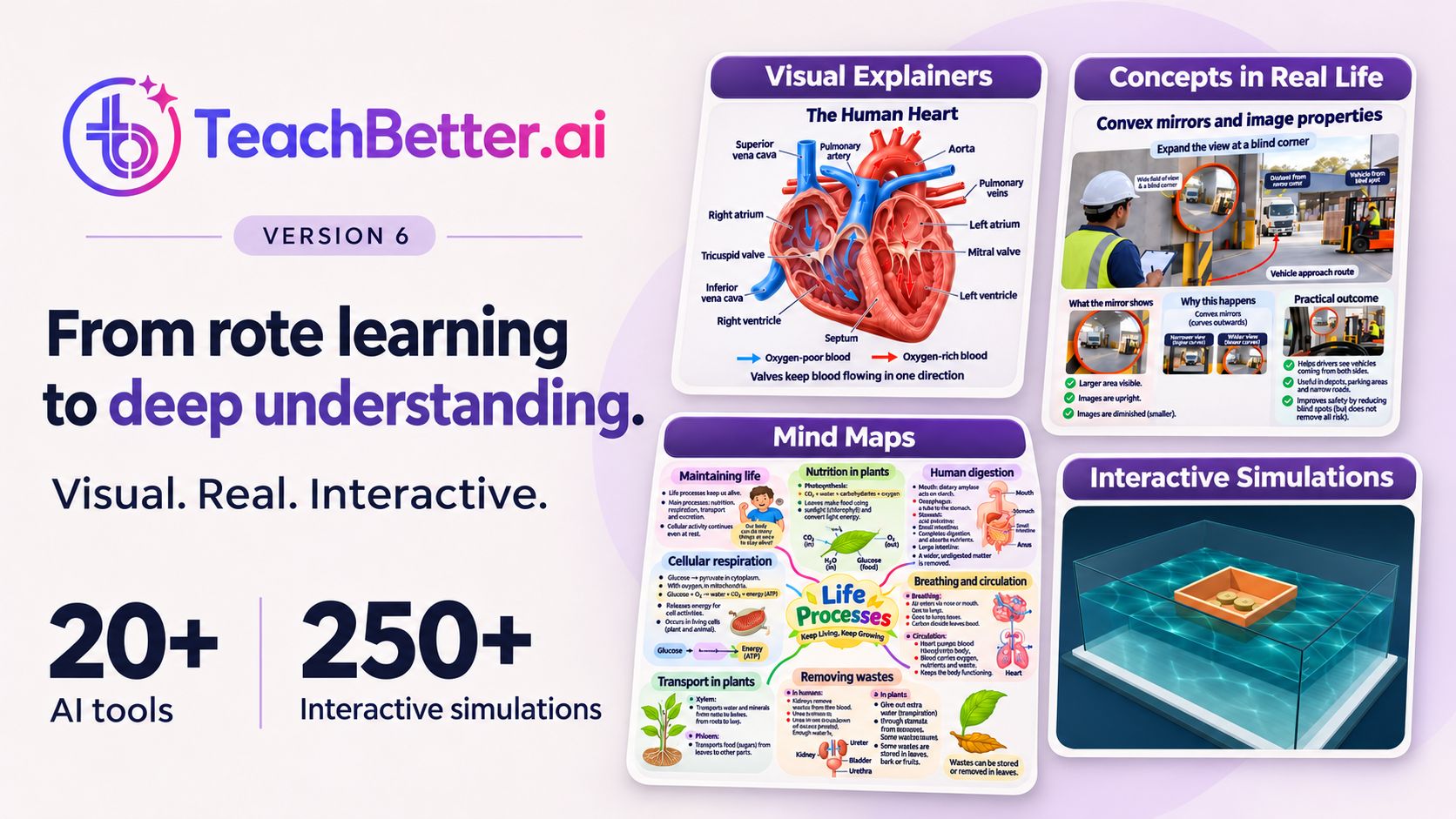
Teachers can use it alongside Visual Concept Explainers, Mind Maps, Interactive Simulations, TeachBetter.ai’s 20-plus AI tools and PaperQR classroom assessments to support explanation, exploration, application and assessment.
Bring Classroom Concepts into the World Students Know
Students are more likely to engage deeply with learning when they can see what a concept explains, where it appears and why it matters.
With Concepts in Real Life, TeachBetter.ai helps teachers make those connections visible through clear, engaging and ready-to-use educational visuals. Real-life applications of concepts help students understand, apply and remember classroom learning.
Teachers can find a relevant resource, personalise it for their school or class, and use it to support explanation, discussion, application and revision. Students gain more opportunities to recognise learning beyond the textbook and understand how academic ideas operate in familiar situations.
Because when students can connect a concept with life, they are better prepared to understand it, apply it and remember it.
Bring classroom learning closer to life with TeachBetter.ai.
Explore Concepts in Real Life on TeachBetter.ai

Vipin Kumar, Co-Founder, TeachBetter.ai
Vipin Kumar is building TeachBetter.ai to create intuitive AI tools that simplify teaching and enhance learning outcomes. With prior experience at global technology companies, he brings a deep understanding of scalable systems, user needs, and practical digital solutions. His mission is to make AI adoption in education easy, affordable, and truly impactful for teachers everywhere. He is committed to creating AI solutions that save time, boost creativity, and empower educators to focus on what matters most—teaching.
Read other articles authored by Vipin Kumar here.